

IRS Notice CP2000: What It Is and How to Respond

IRS Notice CP2000 is the Notice of Underreported Income.
The IRS typically sends this notice via certified mail.
The IRS sends out this notice when it believes there is a discrepancy between 1) the tax return you filed and 2) information reported to the IRS on tax forms such as W-2s and 1099s that were issued to your Social Security number.
For example, in the CP2000 Notice pictured throughout this article — a redacted version of an actual notice one of our clients received in November 2024, in the IRS’s redesigned CP2000 format — the IRS proposed an additional $28,604 in tax, penalties, and interest for the 2022 tax year.
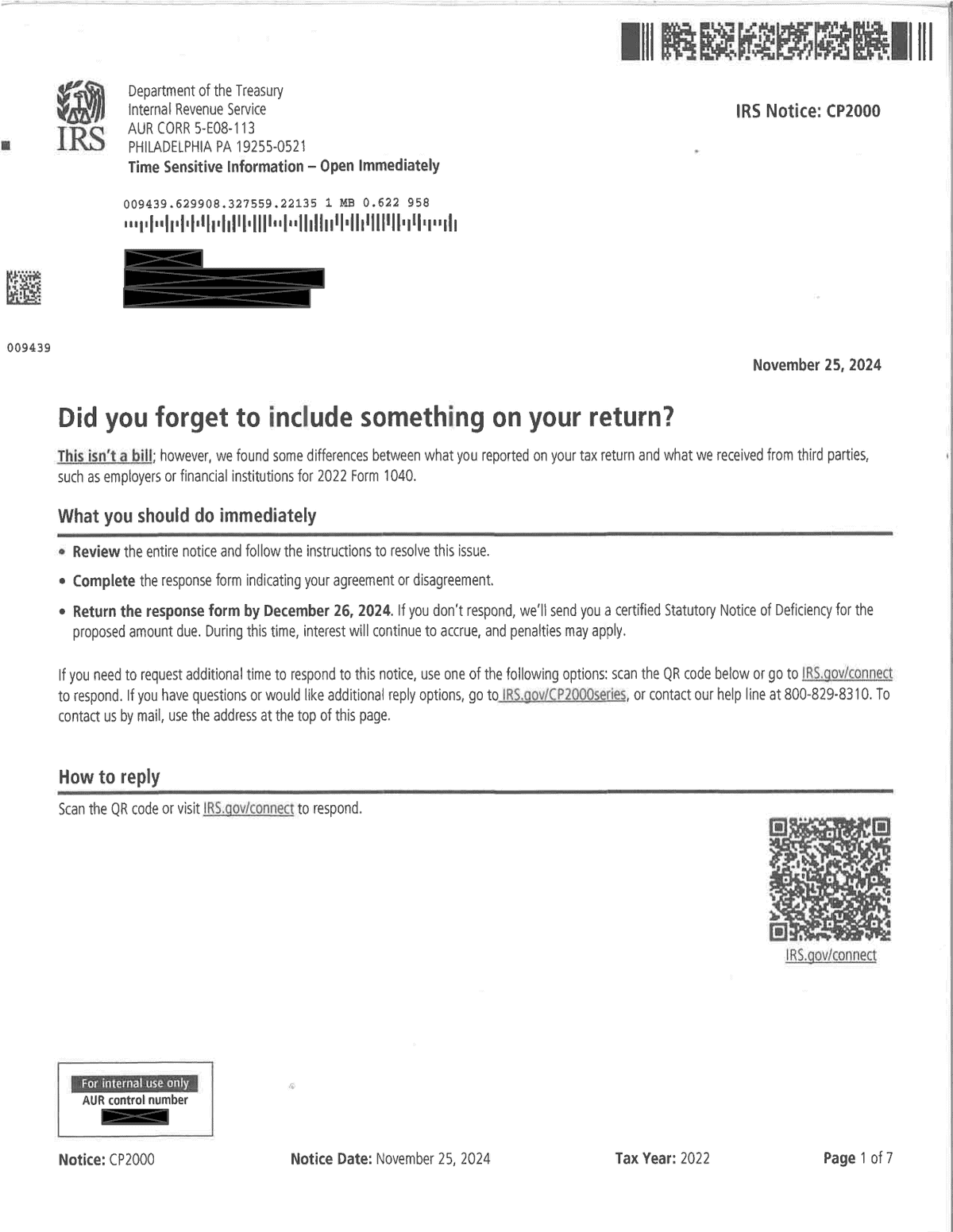
The reason for the notice was that the income third parties reported to the IRS didn’t match our client’s return: Shopify Payments reported $84,903 of payment card transactions on a Form 1099-K issued to our client’s Social Security number, while the return reflected only $18,700 of it — and TikTok issued two Forms 1099-MISC totaling $753 that didn’t appear on the return at all.
But keep in mind that a Form 1099-K reports gross transaction amounts — not taxable income — so the amount the IRS proposes on a CP2000 is frequently overstated before business deductions and other corrections are taken into account; we’ve seen the same dynamic play out with unreported cryptocurrency transactions.
This is why it’s so important to respond to the CP2000 by the deadline in the notice rather than simply agreeing to — or ignoring — the IRS’s proposed figure; more on this later.
Table of Contents
How Soon After a Return Is Filed Does the IRS Issue Notice CP2000?
CP2000s generally start appearing approximately nine to 15 months after a return is filed if the IRS detects a discrepancy.
And if not responded to within 30 days, the Notice CP2000 will typically be followed by the Notice CP3219A, which is a statutory notice of deficiency.
Here is a redacted CP2000 Notice the IRS issued one of our clients.
Free Consultation
Got a CP2000 notice? Get a straight answer before you respond.
Talk to a tax expert — free, no obligation. We’ve resolved over $20 million in IRS debt for our clients.
IRS Notice CP2000 At a Glance
| Notice Type: | 30-Day Letter |
| Generated By: | IRS IRP |
| Preceded By: | N/A |
| Followed By: | Notice CP3219A |
| Recommended Action: | Take Corrective Action or Pay Balance |
When the IRS Sends Notice CP2000
The most common reason for the IRS sending you a CP2000 Notice is when the following things happened:
- You filed a tax return for the year in question.
- When processing the return, the IRS discovered a discrepancy between information you reported on your tax return and information reported to the IRS on tax forms such as W-2s, 1099s, K-1s, etc.
Note that sometimes, taxpayers actually do report all their income report on their tax forms, but they report an item of income on the wrong line on their tax return — for example, reporting dividend income on the interest income line.
Such errors will also likely trigger a CP2000 Notice from the IRS.
What the Redesigned CP2000 Notice Looks Like, Page by Page
The IRS has updated the design of the CP2000 Notice, and the images below are from a redacted version of an actual CP2000 Notice one of our clients received in November 2024, proposing $28,604 in additional tax, penalties, and interest for the 2022 tax year.
Here’s what each page of the redesigned CP2000 looks like — and what it’s actually telling you.
Page 1: “Did you forget to include something on your return?”
The redesigned CP2000 opens with a plain-English headline — “Did you forget to include something on your return?” — and immediately clarifies that the notice isn’t a bill; rather, the IRS “found some differences” between what you reported on your tax return and what third parties such as employers and financial institutions reported to the IRS.
Page 1 then tells you what to do immediately:
- Review the entire notice.
- Complete the response form indicating your agreement or disagreement.
- Return the response form by the deadline — on our client’s notice, December 26, 2024, roughly 30 days after the November 25, 2024 notice date.
If you don’t respond by the deadline, the IRS warns that it will send you a certified Statutory Notice of Deficiency for the proposed amount due — that’s the Notice CP3219A we mentioned above — while interest continues to accrue.
Page 1 also lists a help line for questions or other ways to reply: 800-829-8310 on our client’s notice.
The most noticeable change from the old CP2000 format is the QR code on page 1: the IRS now wants you to scan it (or visit IRS.gov/connect) to respond to the notice online. The IRS address block at the top of the page is also now flagged “Time Sensitive Information – Open Immediately,” and the footer of every page shows the notice type, notice date, tax year, and page number.
Page 2: “What caused the differences”
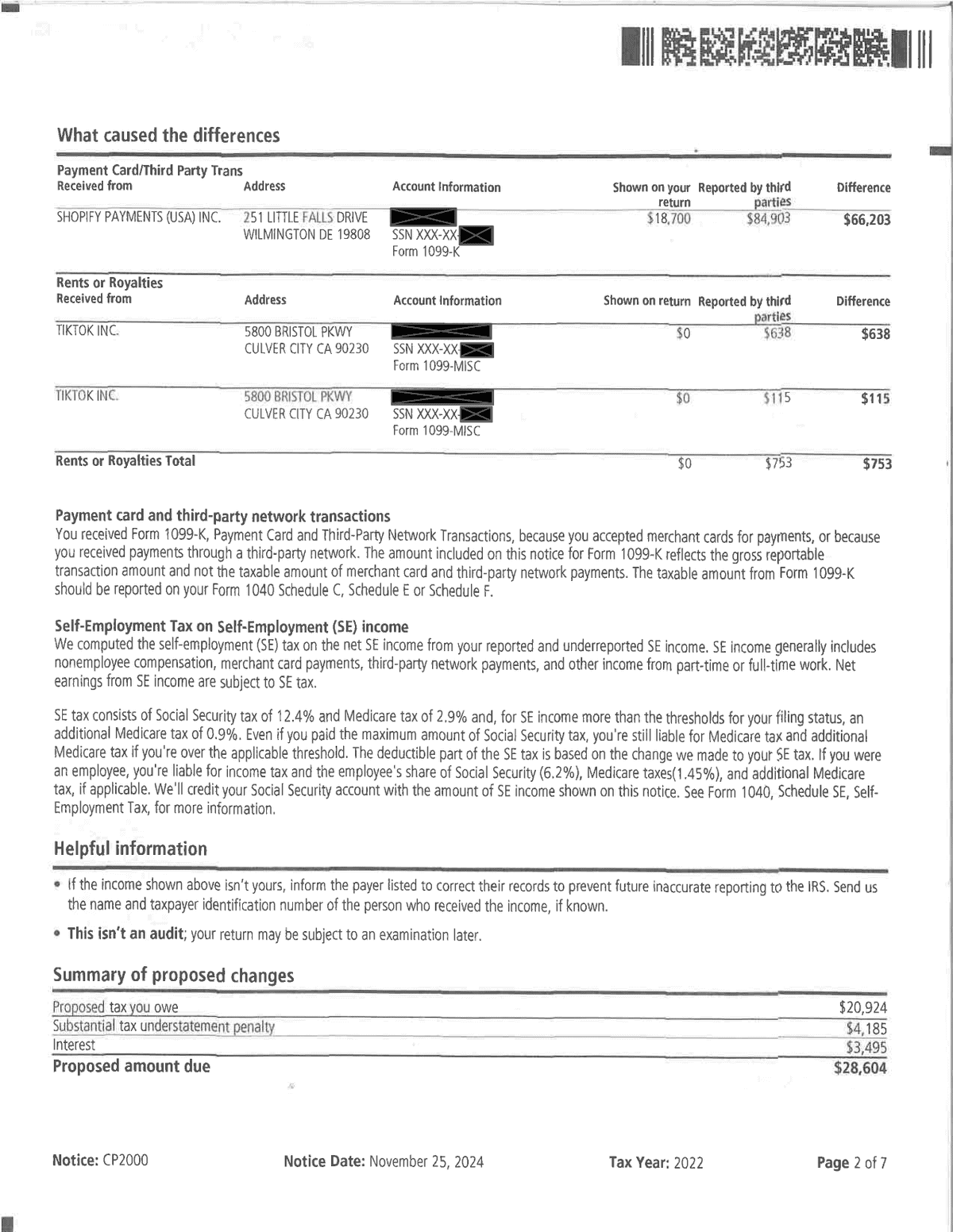
Page 2 is the heart of the redesigned notice: a table for each category of income showing the payer’s name and address, the account information and tax form the payer filed, the amount “Shown on your return,” the amount “Reported by third parties,” and the difference between the two.
On our client’s notice, Shopify Payments (USA) Inc. reported $84,903 of payment card and third-party network transactions on Form 1099-K while the return showed $18,700 — a $66,203 difference — and TikTok Inc. filed two Forms 1099-MISC reporting a combined $753 of rents or royalties that didn’t appear on the return at all.
Below the tables, the IRS explains two things worth reading closely: that the Form 1099-K amount “reflects the gross reportable transaction amount” rather than your taxable income, and how it computed self-employment (SE) tax on the underreported SE income.
Page 2 also contains an important clarification under “Helpful information”: “This isn’t an audit.”
Finally, the “Summary of proposed changes” box totals the damage: $20,924 of proposed tax, a $4,185 substantial tax understatement penalty, and $3,495 of interest, for a proposed amount due of $28,604.
Page 3: “Proposed changes to your 2022 tax return”
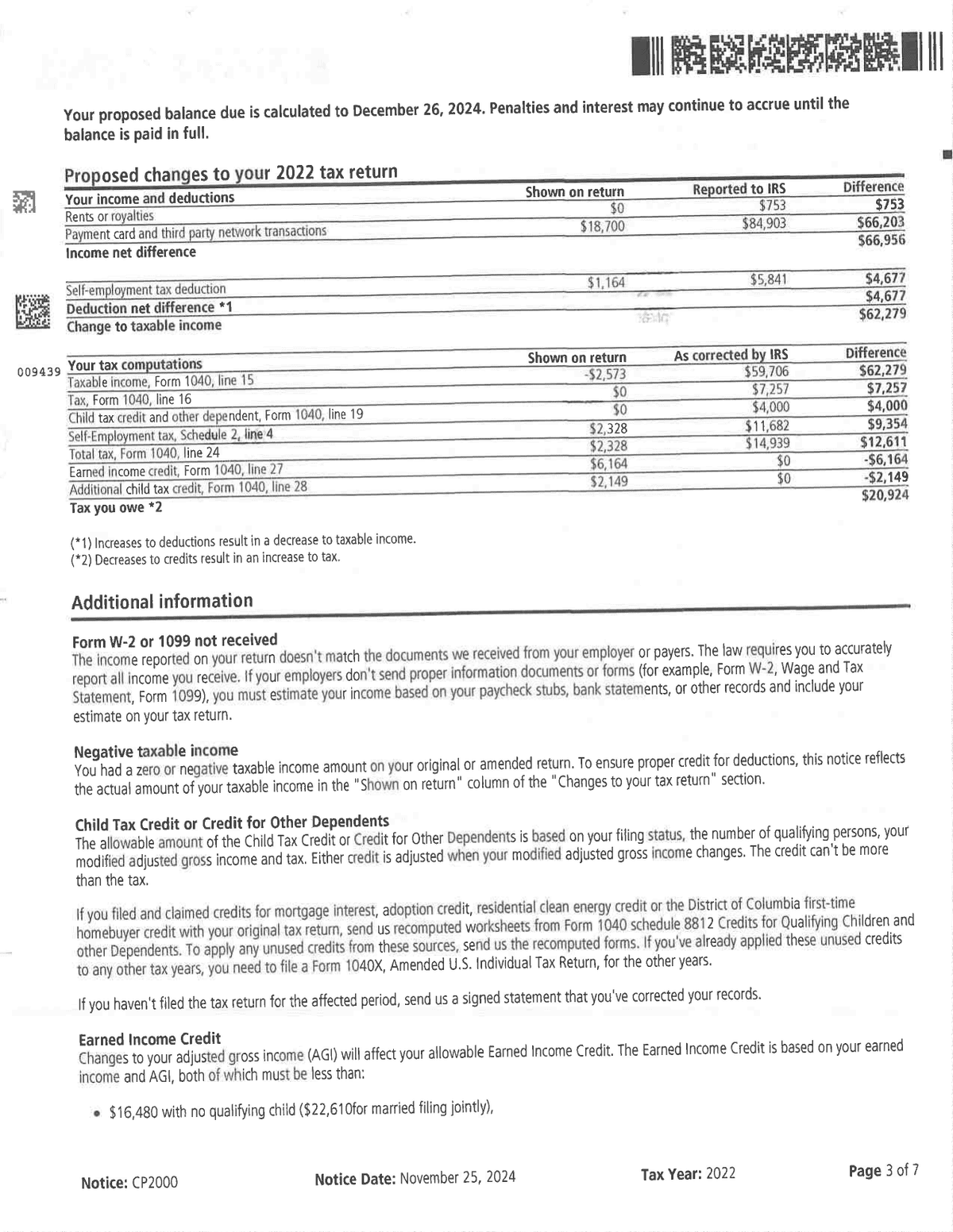
Where the old CP2000 format had an “Explanation of changes to your Form 1040” section, the redesigned notice lays out its proposed changes in two line-by-line tables — one for your income and deductions and one for your tax computations — each with a “Shown on return” column, a “Reported to IRS” or “As corrected by IRS” column, and a difference column.
This is the page to slow down on because it shows exactly how the IRS got to its number, and the changes often reach further than the unreported income itself.
On our client’s notice, the $66,956 of unreported income didn’t just add $7,257 of regular income tax — it also increased self-employment tax by $9,354, disallowed the entire $6,164 Earned Income Credit, and eliminated a $2,149 Additional Child Tax Credit.
Interestingly, the IRS gave our client something back on this page: because the additional income created enough tax liability for the nonrefundable Child Tax Credit to offset, the notice allows $4,000 of Child Tax Credit that the return as filed couldn’t use.
That $4,000 is also precisely why the Additional Child Tax Credit disappeared — the refundable “additional” credit exists to deliver the portion of the Child Tax Credit you couldn’t use against your tax, so once the full credit is absorbed, there’s nothing left to refund.
Netted together, those changes are what produce the $20,924 of proposed tax.
The “Additional information” section that follows explains these ripple effects — for example, how changes to your adjusted gross income affect your allowable Earned Income Credit and Child Tax Credit.
Page 4: Penalties and interest charges
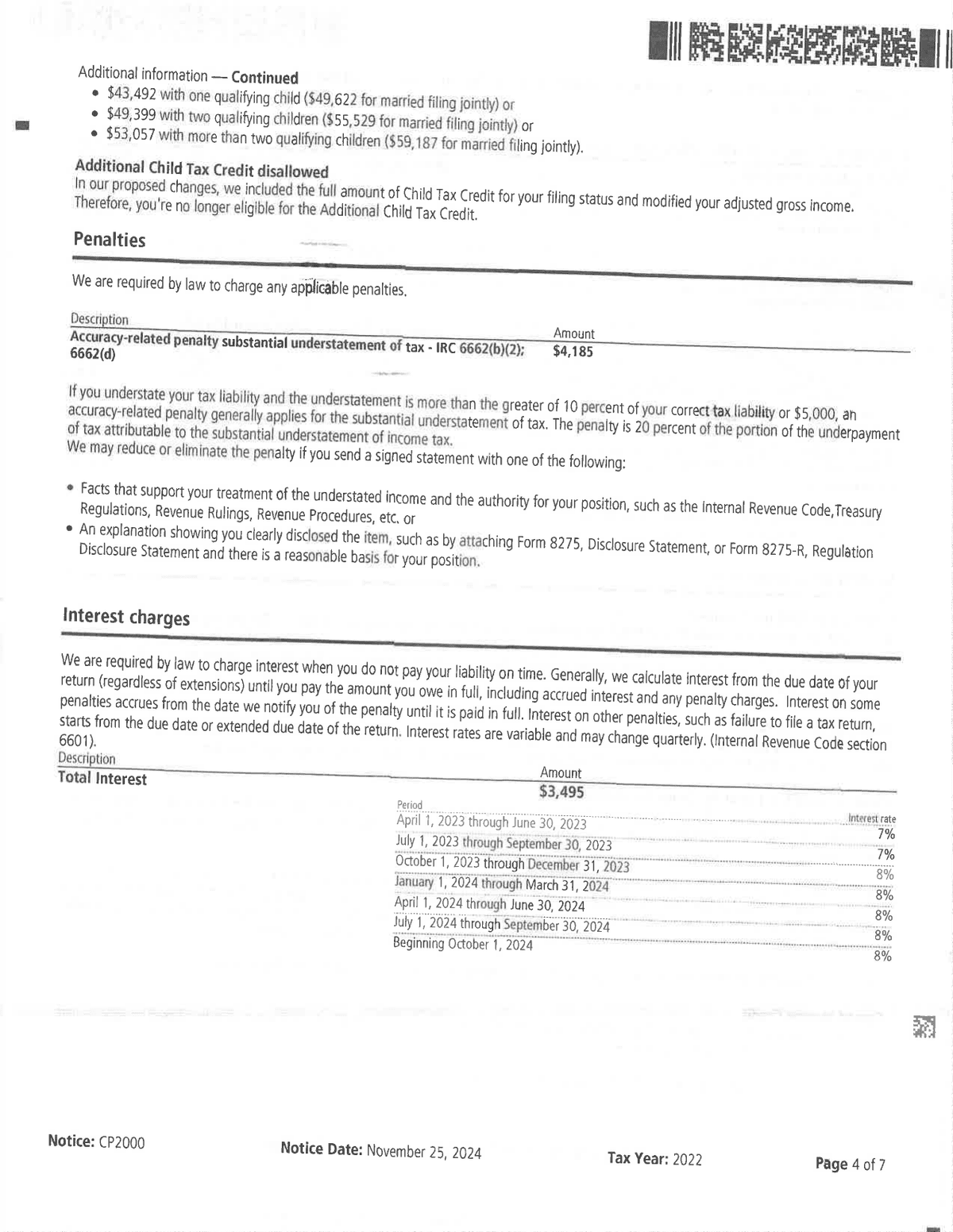
Page 4 itemizes the penalties — on our client’s notice, a $4,185 accuracy-related penalty for substantial understatement of tax under IRC § 6662(b)(2) and § 6662(d), which is 20% of the tax attributable to the substantial understatement.
Helpfully, the notice also tells you how the penalty may be reduced or eliminated: by sending a signed statement with the facts and legal authority supporting your treatment of the understated income, or by showing that you clearly disclosed the item — for example, on Form 8275.
The “Interest charges” section then shows the interest the IRS is proposing — $3,495 here — along with a table of the variable quarterly interest rates it applied, which ranged from 7% to 8% over the periods covered by our client’s notice.
Page 5: Your options if you agree or disagree
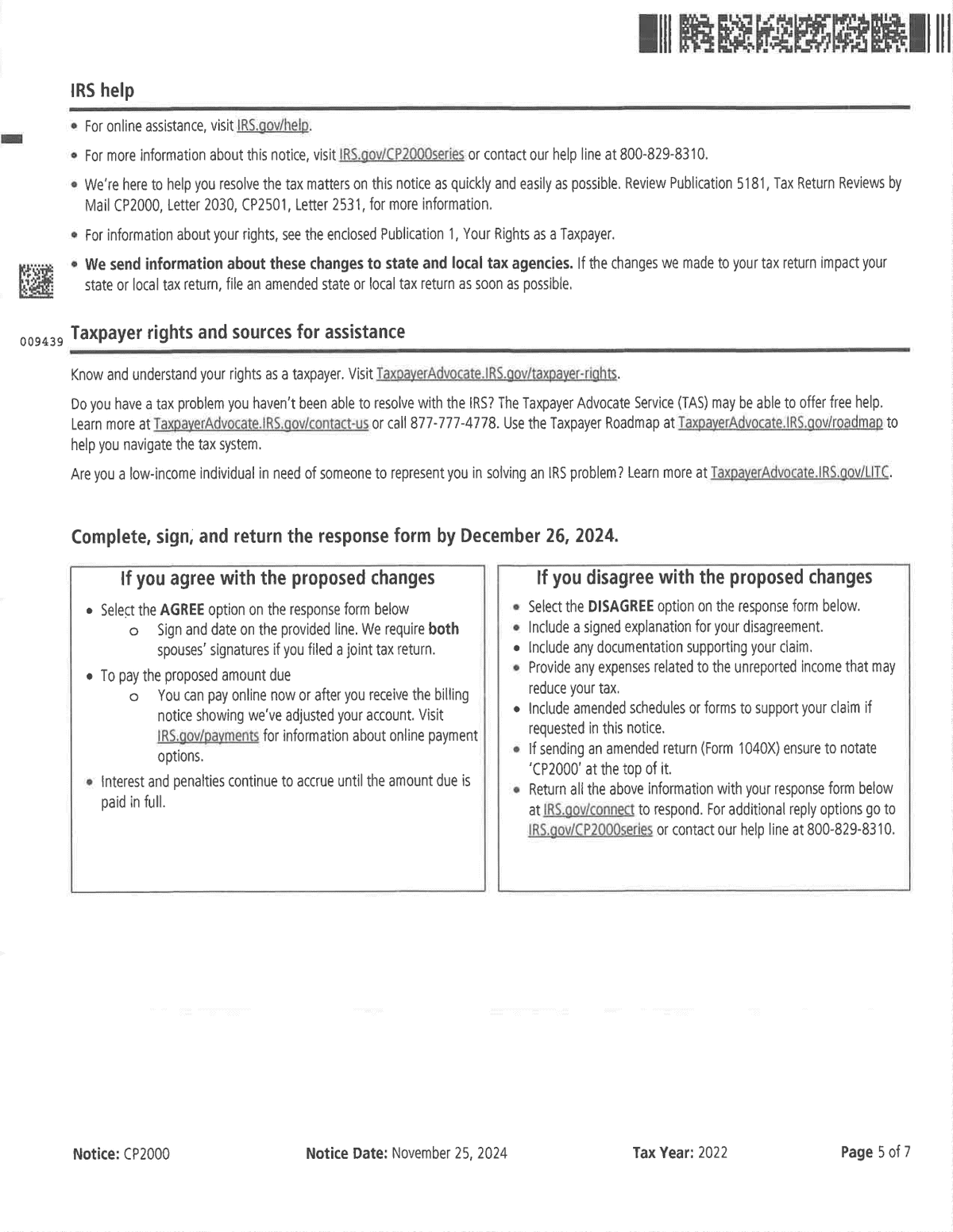
Page 5 lists IRS help resources — including Publication 5181, the Taxpayer Advocate Service, and Low Income Taxpayer Clinics — and then presents two boxes side by side: what to do “If you agree with the proposed changes” and what to do “If you disagree with the proposed changes.”
If you agree, you select the agree option on the response form, sign it (both spouses must sign if you filed jointly), and pay the proposed amount due.
If you disagree, the IRS asks you to include a signed explanation of your disagreement, supporting documentation, any expenses related to the unreported income that may reduce your tax, and amended schedules or forms if requested — and if you send an amended return (Form 1040X), to notate “CP2000” at the top of it.
One easy-to-miss warning on this page: the IRS sends information about these changes to state and local tax agencies, so if the changes to your federal return stand, you may need to file an amended state or local return as well.
Page 7: The Response Form
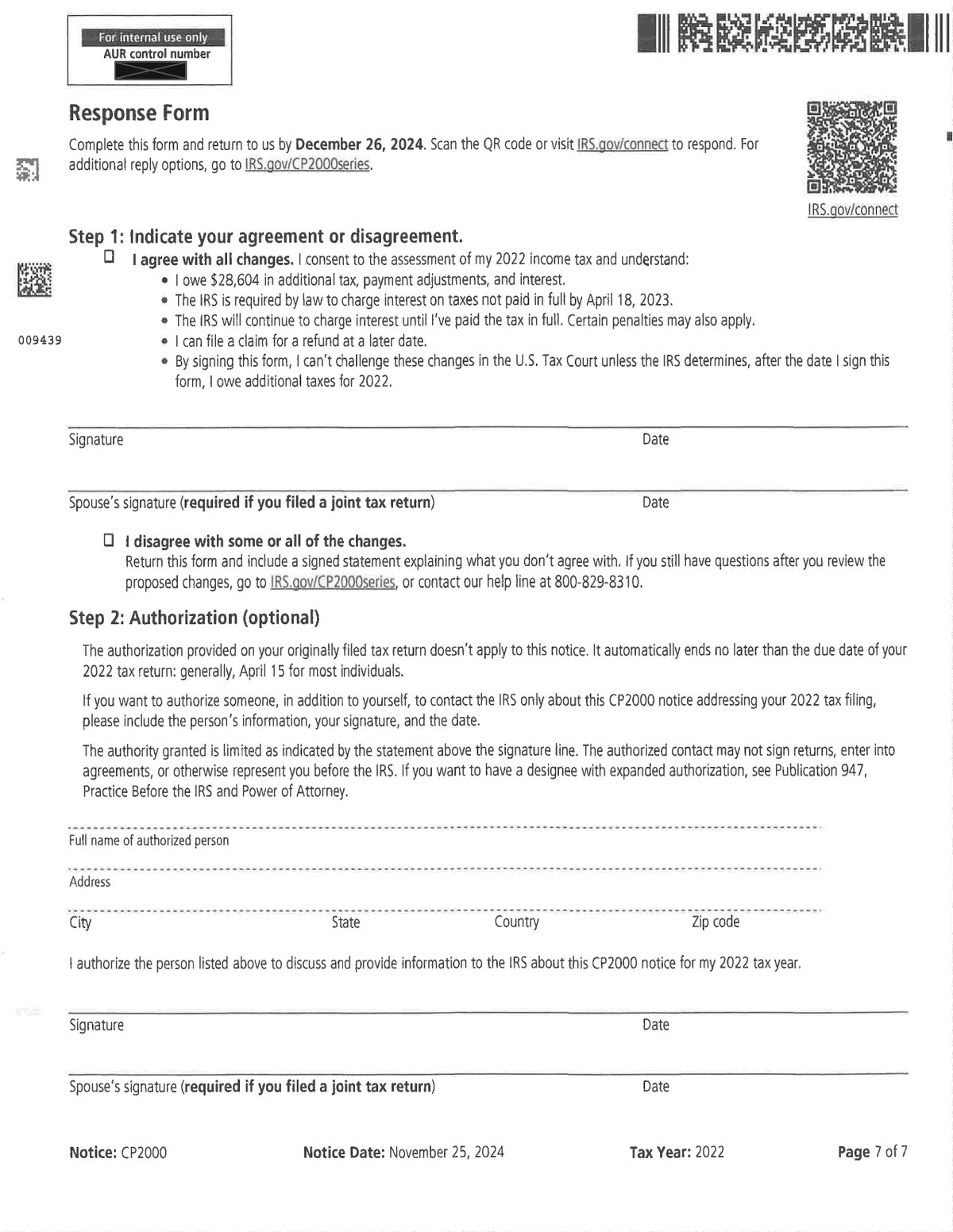
The last page of the notice is the Response Form itself.
Step 1 asks you to indicate your agreement or disagreement by checking a box next to either “I agree with all changes” or “I disagree with some or all of the changes.”
Read the fine print before checking the agree box: you’re consenting to the assessment of the additional tax, interest will continue to accrue until you’ve paid in full, and by signing you generally give up the right to challenge these changes in U.S. Tax Court.
Step 2 is an optional authorization allowing someone else to contact the IRS about this specific CP2000 on your behalf — but note that this limited authorization doesn’t let that person sign agreements or otherwise represent you before the IRS, which requires a power of attorney under Publication 947 (this is what a firm like Choice Tax Relief obtains from clients we represent).
Still have questions? Talk to a tax expert — free.
What You Should Do If You Receive a CP2000 Notice
Below are the steps you should take after you receive a CP2000 Notice.
1. Make sure you actually earned the income that the IRS is claiming you did not report.
Go through the “What caused the differences” section — as well as the “Proposed changes to your tax return” tables — and review, line by line, every item of income the IRS says third parties reported, and ask yourself, “Did I actually earn this income?”
For example, on this client’s notice, TikTok Inc. issued two Forms 1099-MISC to our client’s Social Security number totaling $753 between the two of them — $638 on one and $115 on the other. If the “What caused the differences” section of your CP2000 lists a payer you never actually received money from during the year or a payer that reported more than you actually received, you need to take that up with both the issuer of the 1099 and also with the IRS.
So starting here, you’re going to be making a list of things that:
- you need to take up with the IRS in the letter you’re going to write them in response to the CP2000 and
- you need to take up with other parties, primarily entities that issued you erroneous tax documents.
Obviously if you didn’t actually earn the income reported on the 1099 or at least not all the income that was reported on the 1099, then the tax form the IRS is looking at and based on which it is proposing to assess an additional liability against you is erroneous and the IRS is overcalculating your tax liability.
And no one’s going to fix it other than you (or your representative).
So this is the first step — review the income the IRS is saying you didn’t report, compare it to your own records, and if there are discrepancies, keep a running list of things you need to do to fix this.
2. For income you did earn but didn’t report on your return, check for deductions.
So let’s say you were an Uber driver and you made $50,000 gross during the year driving for Uber but you forgot to include your Uber income on your tax return.
So nine to 15 months after you file your return, the IRS sends you a CP2000 indicating that Uber issued you a 1099 showing $50,000 and the IRS is proposing an assessment of taxes, penalties, and interest on you assuming that you should have reported an additional $50,000 of income on your tax return.
And in this instance, the IRS is correct that you didn’t report that $50,000 of Uber income as gross receipts on your Schedule C. However, you have business deductions you can take against that $50,000; so you shouldn’t be taxed on the full $50,000 — which is what the IRS is proposing in the CP2000 — you should only be taxed on your net business income from your Uber driving.
And obviously from that $50,000 gross, you can deduct things like Uber’s cut as well as the vehicle expenses you incurred while earning income driving for Uber using either the standard mileage method or the actual expenses method (not going to get into that here).
And those expenses might be $30,000 — I’m just making up a figure, by the way — so your net business income would only be $20,000.
So even though the IRS is right you didn’t report that $50,000 as gross receipts on Schedule C like you should’ve, the IRS doesn’t know your expenses, and they’re not going to estimate expenses for you; it’s on you to inform the IRS about these expenses.
If you would have reported the $50,000 of gross Uber income on your Schedule C, you would have reported these expenses to the IRS on all the expense lines on Schedule C, but because you didn’t, you’ll have to inform the IRS of them in your response to the CP2000.
On this point, may even want to prepare a dummy Schedule C to attach to your response saying, “Hey, IRS, this is what my Schedule C should have looked like had I filed it correctly.”
3. Calculate how much taxes you actually owe.
So now that you’ve gone through the previous steps, I would actually recommend that you prepare a tax return showing what your tax liability should actually be if you include all the income you didn’t report correctly on your actual tax return, including deductions.
If you still have access to your tax software, you can try to do it that way or if you’ve hired a professionals like us at Choice Tax Relief to respond to the CP2000 on your behalf, we will do that for you.
Because at the end of the day, you want to know what you actually owe; don’t trust the IRS to calculate your liability for you.
Now, if you really want to get fancy, you would probably want to calculate the penalties and interest as well to check the IRS’ math on that — and that’s something we would do for you at Choice Tax Relief — but that may be a bit complicated if you don’t have the tools to do that.
4. Determine if you’re still subject to the substantial understatement penalty.
That said, there is one penalty that you should probably do the math on, and that’s the accuracy-related penalty for substantial understatement of tax.
The IRS assesses this penalty if you understate your tax liability on your tax return and this understatement is more than the larger of these two figures:
- 10% of your correct tax liability
- $5,000
So let’s go back to the Uber example.
IRS says that you didn’t report $50,000 of self-employment income, and it calculated what it believes your tax to be on $50,000 of self-employment income in the proposed assessment.
The actual math is more complicated than this, but assuming your marginal regular income tax rate on all this income is 24%, the IRS would say you owe an additional $12,000 in regular income tax on this income.
And you’d also be subject to self-employment tax at a rate of 15.3% on this income assuming that you haven’t maxed out your Social Security income limit through other income you earned.
(And yes, tax nerds, I know there’s a a 92.35% multiplier in here as well, but let’s just keep things simple for the sake of example.)
So that means that the IRS would also propose an assessment of $7,650 of self-employment tax on this $50,000 as well, but let’s round up to $8,000 just for sake of example.
So combining the $12,000 in regular income tax and $8,000 of self-employment tax, then in the IRS’ mind, the amount of your understatement of tax liability on your tax return is $20,000.
Now what you have to do is add this figure to the amount of tax liability you actually reported on your return — let’s say that was $10,000.
So your “correct” tax liability in the IRS’ mind is $30,000.
So in the IRS’ mind because your $20,000 understatement exceeds $5,000 (which is the greater of $5,000 or 10% of your correct tax liability of $30,000, so the greater of $5,000 or $3,000), it believes that you are subject to the substantial understatement penalty.
And the penalty itself is 20% of the understatement, so in this case 20% of $20,000, which is $4,000.
5. Send your response to the IRS, along with supporting documentation.
At this point, you have an idea of what your game plan is and what you think the additional assessment of tax should be.
So now, you have to explain all this to the IRS because they’re not going to change their mind if you don’t change their mind; they’ve proposed an assessment and have communicated it to you on the CP2000; now you have to step up to the plate and convince them otherwise.
You do this by writing a letter to the IRS and sending it — along with the notice’s response form and your supporting documentation — either by fax to the number on the CP2000 or online at IRS.gov/connect, which is where the QR code on page 1 of the redesigned notice points.
Check out some sample CP2000 response letters here.
What if you agree with the IRS?
If you agree with the IRS’ proposed assessment in the CP2000 — meaning that 1) you agree that you did not report the income the IRS indicated in the “What caused the differences” section of the CP2000, 2) you have no deductions or other tax benefits to claim about this income, and 3) you agree with the IRS’ calculation of the tax on this income along with penalties and interest, simply check the box next to “I agree with all changes” and send that back to the IRS.
IRS Notice CP2000 FAQs
Here are some frequently asked questions about IRS Notice CP2000.
Is a CP2000 an audit?
No, a CP2000 is not an audit.
IRS audits typically result in an extensive examination of a taxpayer’s books, records, and other supporting documentation for amounts or positions taken on their tax return.
CP2000 Notices, however, are simply computer-generated notices that inform a taxpayer of discrepancies between their tax return and other tax documents filed with the IRS.
What if you submit an amended return in response to a CP2000?
If you submit an amended return in response to a CP2000, the processing unit that you submitted the amended return to would simply transfer your amended return to the IRS Automated Underreporter Unit, and they would inform you of this using Letter 86C.
Here’s an example Letter 86C the IRS sent our client because they mailed in an amended return in response to a CP2000.
What about Notices CP2000A, CP2000B, CP2000C, CP2000D, and CP2000E?
Let’s say you get a Notice CP2000, and you or your representative respond to it.
If the IRS agrees — either in full or in part — with the information you provide, it will calculate a new proposed assessment and send you a Notice CP2000A for you to either agree to or dispute.
If you dispute the new proposed balance due, and you submit more information to the IRS, and the IRS agrees with you, it will update its proposed assessment yet again and send you a Notice CP2000B.
Every time the IRS updates its proposed assessments, it sends you the next “letter” in the CP2000 series.

“They were friendly, professional, and encouraging. They helped straighten out my challenging tax situation and stuck with it until everything was resolved. I highly recommend!”
Get Help Now
Got a CP2000 notice? Get a straight answer before you respond.
Talk to a tax expert — free, no obligation. We’ve resolved over $20 million in IRS debt for our clients.


Author:

Logan Allec, CPA, Founder and Owner
Logan Allec has been serving taxpayers as a CPA for over 14 years. After leaving his role at a "Big 4" firm, he started Choice Tax Relief to help everyday Americans who have found themselves behind on their taxes. He also educates thousands of people daily about tax relief on his YouTube channel. In addition to his CPA license, Logan also has a Master's Degree in Taxation from the University of Southern California (USC). He lives with his wife and children in the Los Angeles area. Learn more about Logan here.