

IRS Notice CP89: What It Is and How to Respond

If you’re making monthly payments to the IRS under an installment agreement, once a year the IRS will send you IRS Notice CP89 — your Annual Installment Agreement Statement.
Unlike most IRS notices, the CP89 Notice isn’t asking you for anything.
In fact, the IRS stamps it with the words “THIS IS NOT A BILL” in bold at the top of the first page.
Think of it as your payment plan’s annual report card. It shows:
- Every payment the IRS received from you over the past year
- How those payments were applied
- Where each of your tax balances stands now
Here is a redacted CP89 Notice that one of our clients received.
That said, “informational” doesn’t mean “ignorable.”
The CP89 Notice is your best annual opportunity to catch misapplied payments, watch how much penalty and interest your balance is still generating, and decide whether your payment plan is actually working for you.
In this article, I’ll walk you through the current IRS Notice CP89 part by part and explain exactly what to check when yours arrives.
Key Takeaways
- IRS Notice CP89 is your Annual Installment Agreement Statement — an informational summary, not a bill. The IRS sends it once a year for as long as you have installment agreement activity.
- It has two key sections: a Payment Detail page listing every payment received during the 12-month statement period, and an Installment Agreement Activity page showing beginning and ending balances for each tax year you owe.
- Review it carefully — if a payment you made is missing, the IRS itself says to call the number on the notice to resolve the discrepancy.
- The statement reveals a hard truth of installment agreements: penalties and interest keep accruing on your unpaid balance, so some of your payments go to those charges rather than your tax.
- No response is required — but it’s the perfect annual prompt to pay down your balance faster, modify your plan, or explore a better resolution like an offer in compromise.
Table of Contents
IRS Notice CP89 At a Glance
| Question | Answer |
|---|---|
| What is it? | Your Annual Installment Agreement Statement — a yearly summary of your payment plan activity |
| Is it a bill? | No. The notice says so right at the top: “THIS IS NOT A BILL.” |
| Who gets it? | Taxpayers with installment agreement activity during the statement year |
| Do I need to respond? | No — but you should review it and call the IRS if a payment is missing or misapplied |
| How often does it come? | Once a year, for as long as you have installment agreement activity |
Free Consultation
Got a CP89 notice? Get a straight answer before you respond.
Talk to a tax expert — free, no obligation. We’ve resolved over $20 million in IRS debt for our clients.
CP89 vs. CP521D vs. CP523: What’s the Difference?
The IRS sends taxpayers on payment plans several different notices, and it’s easy to mix them up.
Here’s how the annual CP89 statement compares to the monthly CP521D payment reminder and the far more serious CP523 default notice.
| CP521D | CP89 | CP523 | |
|---|---|---|---|
| What it is | Monthly reminder that your installment payment is due | Annual statement of your payment plan activity | Notice of intent to terminate your installment agreement |
| How often | Monthly | Annually | Only if you default |
| Action required | Make your monthly payment | None — review for accuracy | Act immediately to save your agreement |
IRS Notice CP89 Explained, Part by Part
Here is a full explanation of the Notice CP89, part by part, based on a recent CP89 Notice.
Part 1: Notice Header
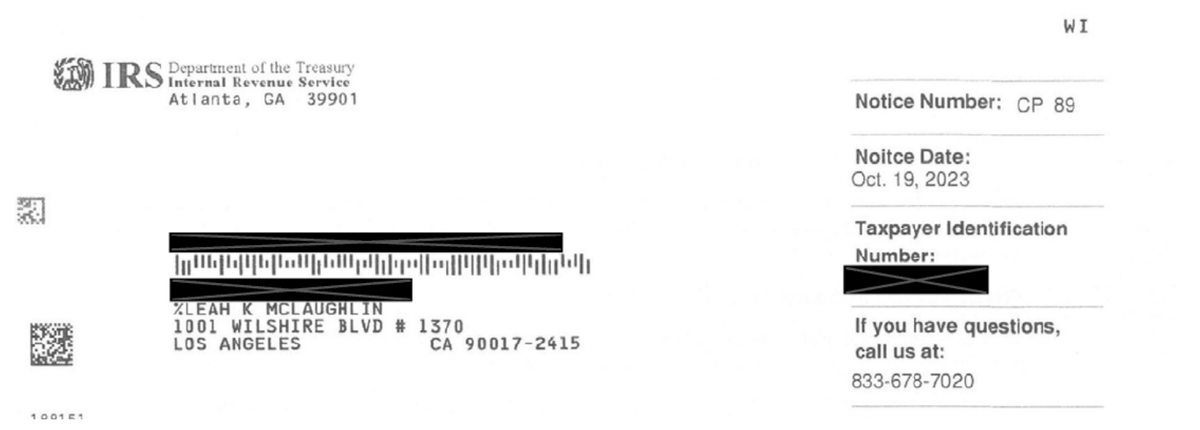
At the top of the first page, the IRS identifies the notice by number (CP 89), the notice date, and your taxpayer identification number, along with a phone number to call if you have questions — 833-678-7020 on this client’s notice.
Part 2: “This Is Not a Bill”

Next comes the single most reassuring line on any IRS notice: “THIS IS NOT A BILL.”
The IRS then identifies the document as your Annual Installment Agreement Statement and notes that it’s “for your information.”
In other words: nothing is wrong, no new balance is being demanded, and no deadline is looming.
Take a breath.
Part 3: Statement Overview
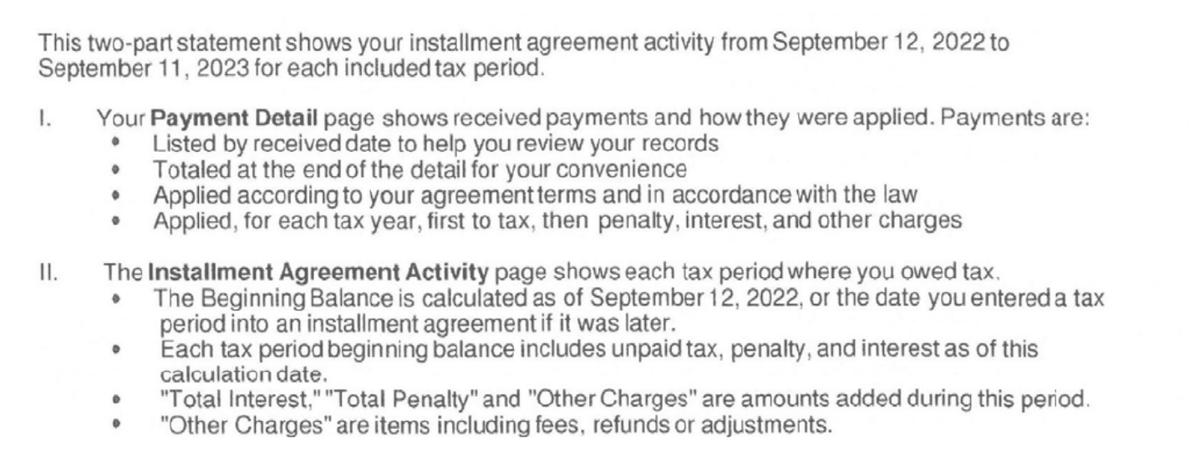
The IRS then explains that the statement covers your installment agreement activity for a specific 12-month period — September 12, 2022 through September 11, 2023 on this client’s notice — and describes its two main sections.
The Payment Detail page lists every payment the IRS received, sorted by received date, totaled at the end, and applied according to your agreement terms — for each tax year, first to tax, then to penalty, interest, and other charges.
The Installment Agreement Activity page shows each tax period where you owed tax, including a beginning balance (unpaid tax, penalty, and interest as of the calculation date), the interest and penalties added during the period, and other charges such as fees, refunds, or adjustments.
Part 4: Payment and Plan-Change Options

The IRS then points you to two useful tools.
To pay your full balance or review your current balance details by year, you can visit IRS.gov/account.
To modify your installment agreement — your payment date, payment amount, or bank information — you can use IRS.gov/paymentplan, where you may also be able to convert your payments to automatic bank withdrawals if you don’t already have a direct debit installment agreement.
The IRS also confirms it will mail your statement annually for as long as you have installment agreement activity.
Part 5: Penalty for Paying Late
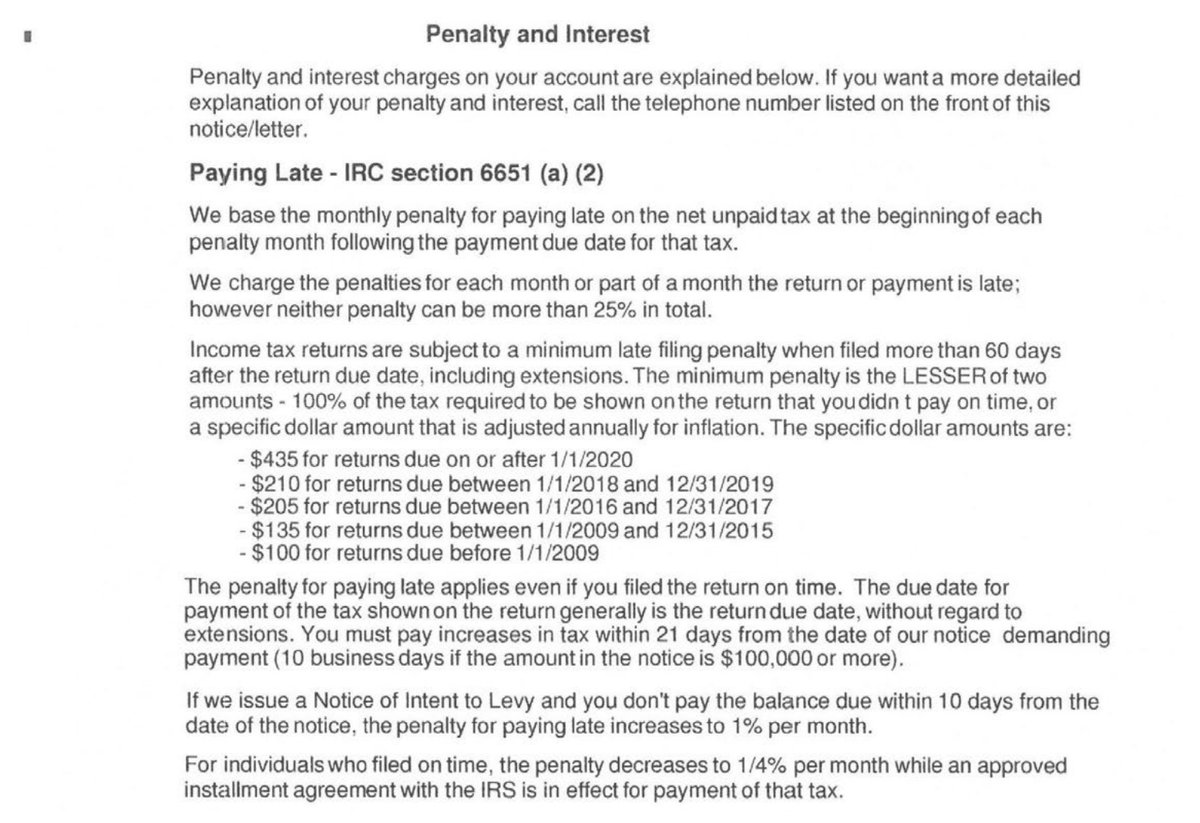
Page 2 of the notice explains the penalties on your account, starting with the failure-to-pay penalty under Internal Revenue Code Section 6651(a)(2).
The IRS bases this monthly penalty on the net unpaid tax at the beginning of each penalty month, and neither the late-filing nor late-payment penalty can exceed 25% in total.
Buried in this section is a detail that matters a great deal to anyone on a payment plan: for individuals who filed on time, the failure-to-pay penalty decreases to 1/4% per month while an approved installment agreement is in effect.
That’s one of the quiet perks of getting on a payment plan — your penalty clock slows down, even though it doesn’t stop.
Part 6: Interest
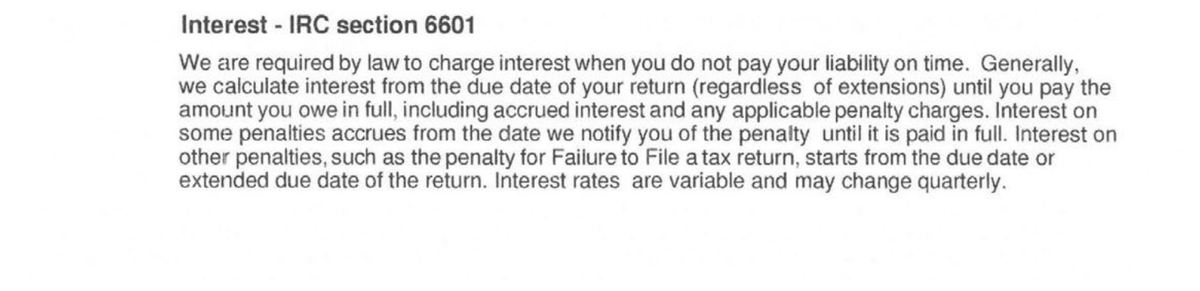
The IRS is required by law to charge interest under Internal Revenue Code Section 6601 when you don’t pay your liability on time, calculated from your return’s due date until the amount is paid in full — including interest on accrued penalties.
Interest rates are variable and can change quarterly, and unlike some penalties, interest generally cannot be removed for reasonable cause.
Part 7: Payment Detail
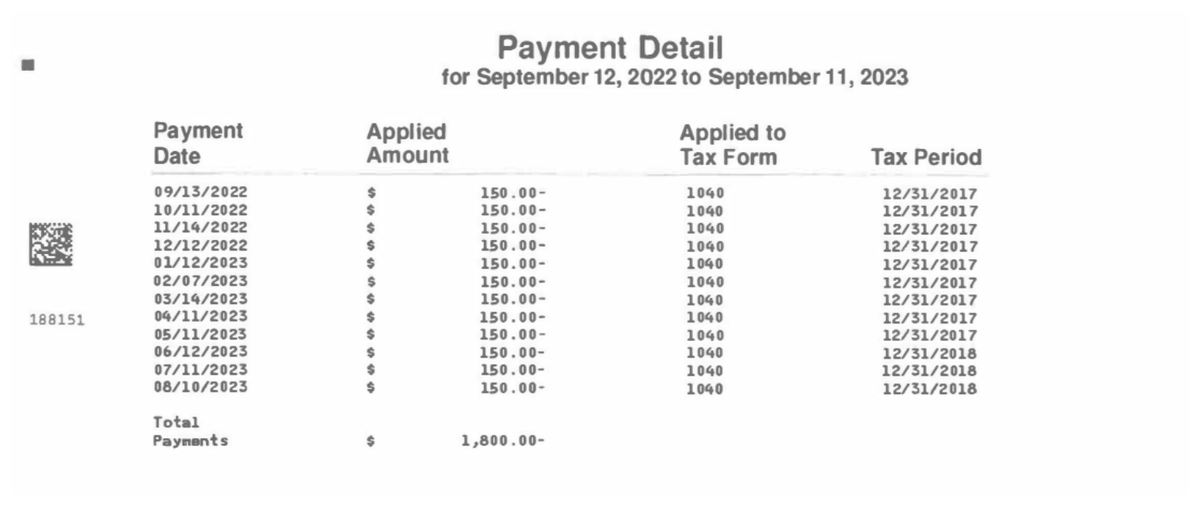
Now we get to the heart of the statement.
The Payment Detail page lists each payment the IRS received during the statement period — the date it was received, the amount, the tax form it was applied to, and the tax period it was applied to.
On this client’s notice, the taxpayer made twelve $150 monthly payments totaling $1,800.
Notice something interesting: the first nine payments were applied to tax year 2017, and once that year was paid off, the payments automatically rolled forward to tax year 2018.
That’s the IRS applying payments to your oldest liability first, exactly as the statement overview described.

Below the table, the IRS notes that payments received after the statement cutoff date will appear on your next annual statement — and, importantly, that if you think the IRS missed crediting a payment, you should call the number listed (833-678-7020 on this client’s notice) to resolve the discrepancy.
Part 8: Installment Agreement Activity

Finally, the Installment Agreement Activity page — printed in landscape orientation — summarizes each tax year in your agreement:
- The beginning balance
- Total payments received
- Total penalty added
- Total interest added
- Other charges
- The ending balance
This client’s notice tells a story you’ll see on many CP89 statements.
The taxpayer started the year owing $5,442.29 across tax years 2017 and 2018, paid in $1,800 — and ended the year at $3,706.99.
Tax year 2017 was wiped out entirely, but along the way the IRS added $89.11 in penalties and $264.59 in interest. That’s the cost of paying the IRS on installments: your balance shrinks, but not by the full amount of every check you write.
The CP89 is an annual statement.
It differs from the CP14IA you likely received when your installment agreement was first set up — that notice confirmed the plan was active, while the CP89 recaps a full year of activity on it.
When Does the IRS Send Notice CP89?
The IRS sends the CP89 Notice once a year, and it will keep coming annually for as long as you have installment agreement activity.
Each statement covers a roughly 12-month period, with the notice itself arriving several weeks after the period closes — this client’s statement covered September 12, 2022 through September 11, 2023, with a notice date of October 19, 2023.
If you’re on a payment plan, you’ll typically also receive a monthly payment reminder — see our full breakdown of the IRS Notice CP521D — unless you’ve switched to direct debit or opted in to paperless reminders.
Still have questions? Talk to a tax expert — free.
What Should You Do After Receiving Notice CP89?
No response is required — but I wouldn’t just toss it in a drawer, either.
Here’s what I recommend doing with your CP89 Notice.
Step 1: Check the Payment Detail Against Your Own Records
Pull up your bank statements and compare them to the Payment Detail page.
Every payment you made during the statement period should appear, in the right amount.
If a payment is missing or looks misapplied, call the number on your notice — the IRS explicitly invites you to do so, saying it will “resolve discrepancies.”
Have your account information and proof of payment handy when you call.
Step 2: Look Hard at the Ending Balances
The Installment Agreement Activity page tells you whether you’re actually winning.
Compare your total payments to how much your ending balance actually dropped — the difference is the penalty and interest the IRS added during the year.
If your balance is barely moving, your monthly payment may be little more than a treadmill.
Step 3: Consider Paying More — or Restructuring Your Plan
Because interest accrues on the remaining balance, every extra dollar you pay shortens your payoff and cuts your total cost. If you have room in your budget, increase your monthly payment or make an extra payment at IRS.gov/account.
If your payment no longer fits your situation, modify your plan at IRS.gov/paymentplan — you can change your payment amount, payment date, or bank information, or switch to direct debit.
Step 4: Ask Whether an Installment Agreement Is Still Your Best Resolution
Your CP89 Notice is an annual reminder to step back and ask the bigger question: is this payment plan the right resolution at all?
If your financial situation has worsened since you set up your agreement, you may qualify for an offer in compromise — settling your tax debt for less than you owe — or currently not collectible status, which pauses collections entirely.
And if penalties make up a meaningful slice of your balance, penalty abatement may shrink it.
We review situations like this every day.
Call us at 866-8000-TAX for a free consultation and we’ll tell you honestly whether you’re in the right resolution.
IRS Notice CP89: Frequently Asked Questions
What is IRS Notice CP89?
IRS Notice CP89 is your Annual Installment Agreement Statement. It’s an informational, once-a-year summary showing every payment the IRS received under your payment plan during the statement period, how those payments were applied, and the beginning and ending balances for each tax year you owe.
Is IRS Notice CP89 a bill?
No. The notice states “THIS IS NOT A BILL” at the top of the first page. It doesn’t demand payment or set a deadline — it simply reports your installment agreement activity for the year.
Do I need to respond to Notice CP89?
No response is required. However, you should compare the Payment Detail page against your own records — if the IRS missed crediting a payment, call the number on the notice to resolve the discrepancy.
Why did my balance go down less than I paid?
Because penalties and interest continue to accrue while you’re on an installment agreement. Your payments are applied first to tax, then to penalty, interest, and other charges — so part of what you pay each year covers new charges rather than principal. Paying more than your minimum shortens the payoff and reduces the total cost.
How is CP89 different from CP521D?
The CP521D is a monthly reminder that your next installment payment is due, while the CP89 is an annual statement summarizing the past year’s payment plan activity. Neither means anything is wrong — unlike the CP523, which warns that the IRS intends to terminate your agreement because of a default.
Can I change my installment agreement after reviewing my CP89?
Yes. You can change your payment amount, payment date, or bank information — or convert to direct debit — using the IRS’s Online Payment Agreement tool at irs.gov/paymentplan. If your finances have changed significantly, you may also qualify for a different resolution entirely, such as an offer in compromise or currently not collectible status.

“With so many ads about fixing tax problems, I am so happy I chose Choice Tax Relief. Lulu Peralta started out with excellent customer interaction and she never once lost her focus on my situation.”
Get Help Now
Got a CP89 notice? Get a straight answer before you respond.
Talk to a tax expert — free, no obligation. We’ve resolved over $20 million in IRS debt for our clients.


Author:

Logan Allec, CPA, Founder and Owner
Logan Allec has been serving taxpayers as a CPA for over 14 years. After leaving his role at a "Big 4" firm, he started Choice Tax Relief to help everyday Americans who have found themselves behind on their taxes. He also educates thousands of people daily about tax relief on his YouTube channel. In addition to his CPA license, Logan also has a Master's Degree in Taxation from the University of Southern California (USC). He lives with his wife and children in the Los Angeles area. Learn more about Logan here.