

IRS Notice CP14E: What It Is and How to Respond

IRS Notice CP14E is a Notice of Balance Due and Demand for Payment.
It is a close relative of the much more common CP14 Notice — the IRS sends the CP14E version to taxpayers who filed a tax return showing a balance due and didn’t pay it in full by the return’s due date.
Here is a redacted CP14E Notice that one of our clients received.
Like the CP14, the CP14E is a notice described in Internal Revenue Code § 6303, which requires the IRS — within 60 days of assessing a tax — to send taxpayers a notice stating how much tax they owe and demanding that they pay it.
In our experience, clients tend to receive the CP14E version of this notice after filing Form 1040-SR, the U.S. Individual Income Tax Return for Seniors, with a balance due.
(The IRS uses different version letters of the CP14 internally depending on the form and circumstances behind the balance; the underlying message and required response are the same as a standard CP14.)
If the IRS levies you without sending you the CP14E or an equivalent notice and demand — as well as the CP504 or an equivalent notice of intent to levy and the LT11 or an equivalent Final Notice of Intent to Levy and Your Right to a Hearing — the levy is improper and you should contest the levy.
These notices — or their equivalents — are notices that the IRS must send before levying you.
Note, of course, that the IRS may be sending you notices at an old address!
Table of Contents
Where the CP14E Fits in the CP14 Series
The CP14E is a version of the IRS’s first “Notice of Balance Due” that our clients often receive after filing Form 1040-SR, and it is one of several closely related CP14 notices that each carry a different letter after “CP14.”
Use the table below to see how the CP14E compares to the rest of the series and confirm what your notice means.
| Notice | What It Is | When the IRS Sends It |
|---|---|---|
| CP14 | The IRS's standard first bill for unpaid taxes — the most common balance-due notice it sends. | After you file a return showing a balance due and don't pay it in full by the return's due date. |
| CP14C | A CP14 issued with a disaster-relief cover page that postpones your payment deadline. | When your address of record is in a federally declared disaster area; penalties and interest are paused until the relief period ends. |
| CP14D | The same first bill in the IRS's redesigned “scan-and-pay” layout, with a QR code and resolve-your-balance boxes. | After you file with a balance due and don't pay by the due date — same meaning as a CP14, newer format. |
| CP14E | A version of the first balance-due notice, issued under IRC § 6303 just like the CP14. | After you file with a balance due and don't pay in full — in our experience, often after filing Form 1040-SR (the return for seniors). |
| CP14F | A version of the IRS's first bill in its redesigned “Notice of Balance Due” format. | After the IRS processes your return, finds the tax you reported exceeds your payments and credits, and you haven't paid the balance. |
| CP14G | Another version of the redesigned first bill for unpaid taxes. | After the IRS processes your return, sees an amount due, and doesn't receive full payment by the return's due date. |
| CP14IA | The installment-agreement version — confirms your payment plan is set up while the balance keeps accruing penalties and interest. | After you successfully set up an installment agreement (payment plan) on a balance you owe. |
| CP14J | The failure-to-pay-penalty version — your balance is unpaid tax plus a failure-to-pay penalty and interest. | After you file on time but don't pay in full, so a failure-to-pay penalty (but no failure-to-file penalty) applies. |
| CP14K | A version of the IRS's first bill, nearly identical in meaning to the CP14. | After you file a return with an amount owed and some balance remains unpaid once your payments and credits are applied. |
Free Consultation
Got a CP14E notice? Don’t wait for the IRS’s next move.
Talk to a tax expert — free, no obligation. We’ve resolved over $20 million in IRS debt for our clients.
IRS Notice CP14E At a Glance
| Notice Type: | Notice and Demand |
| Generated By: | IRS ACS |
| Preceded By: | Typically, Filing of a Form 1040-SR (or Other Return) Showing a Balance Due |
| Followed By: | Notice CP501 |
| Recommended Action: | Pay Off Balance or Enter Into Resolution |
IRS Notice CP14E Explained, Part by Part
Here is an explanation of the Notice CP14E, part by part.
Part 1: Amount You Owe, Payment Due Date, and How to Pay
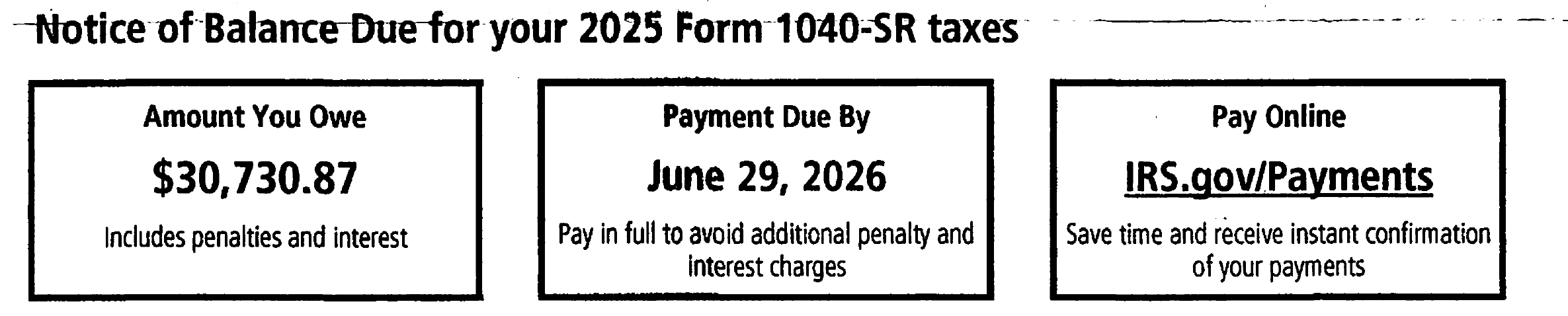
At the top of the notice, the IRS gives you the three most important pieces of information up front:
- The total amount you owe (including all penalties and interest)
- The date your payment is due
- A reminder that you can pay online at IRS.gov/Payments for instant confirmation
Part 2: Why Do I Owe? Billing Summary
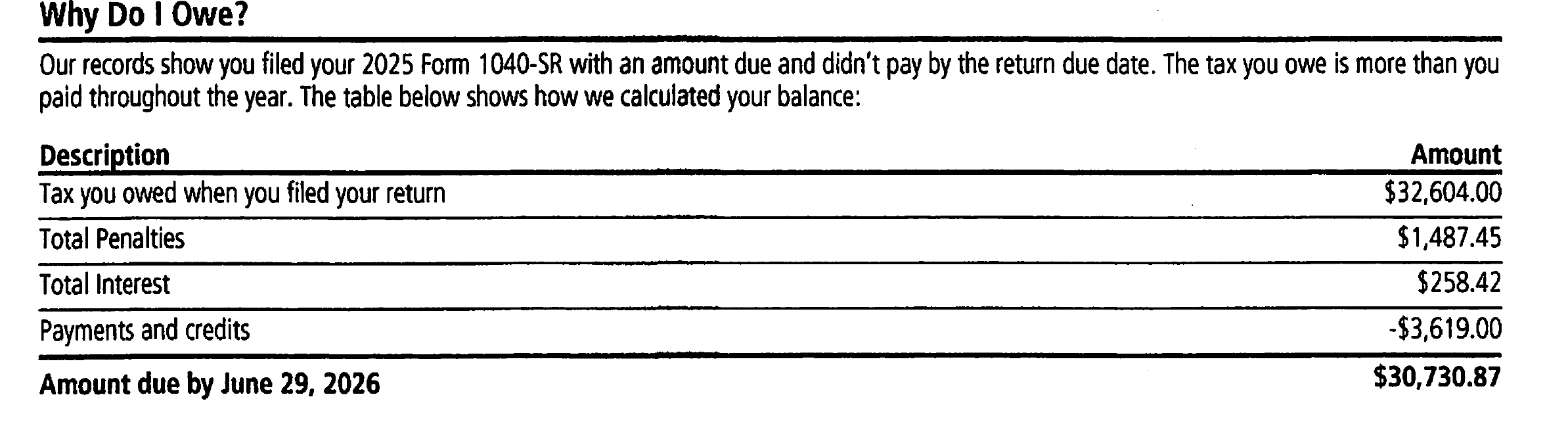
Next, the IRS breaks down exactly how it arrived at your balance due.
This breakdown typically includes:
- The tax you owed when you filed your return
- Total penalties assessed on the account
- Total interest charged on the unpaid balance
- Payments and credits already applied to the account
The notice also warns that this table may not reflect any payment you made within the last 21 days, so don’t pay twice if you’ve already sent in a payment.
Part 3: What Are My Options?

Here, the IRS lays out your choices:
- Pay the balance in full by the due date (online, if possible, to make sure the payment is received on time)
- Apply for a payment plan at IRS.gov/PaymentPlans if you can’t pay in full right now
- Look into hardship options at IRS.gov/Hardship if you’re facing financial difficulty
Part 4: What Happens If You Don’t Respond

The notice then warns you, in a boxed callout, what happens if you miss the payment due date: interest continues to accrue on your entire balance, and additional penalties — potentially adding up to 50% or more of the tax you owe — may apply.
Part 5: Failure-to-Pay Proper Estimated Tax Penalty Calculation
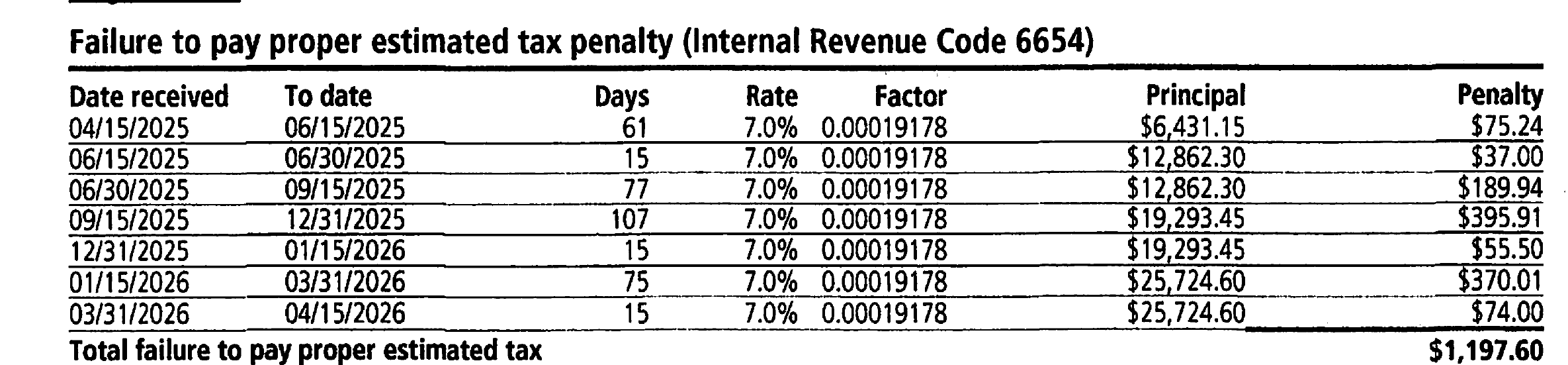
On the second page, the IRS shows its math behind each penalty listed in the billing summary.
This first table covers the failure-to-pay proper estimated tax penalty under Internal Revenue Code § 6654.
This penalty applies when you didn’t pay enough tax throughout the year via withholding or quarterly estimated payments.
The IRS calculates it period by period, based on how much of your tax bill remained unpaid and the applicable interest rate for each stretch of time.
Part 6: Failure-to-Pay Penalty Calculation

Next is the failure-to-pay penalty under Internal Revenue Code § 6651.
This penalty is assessed at 0.5% of the unpaid tax for each month (or part of a month) your balance remains outstanding after the due date, up to a maximum of 25% of the tax shown on the return.
Part 7: Interest Charge Calculation
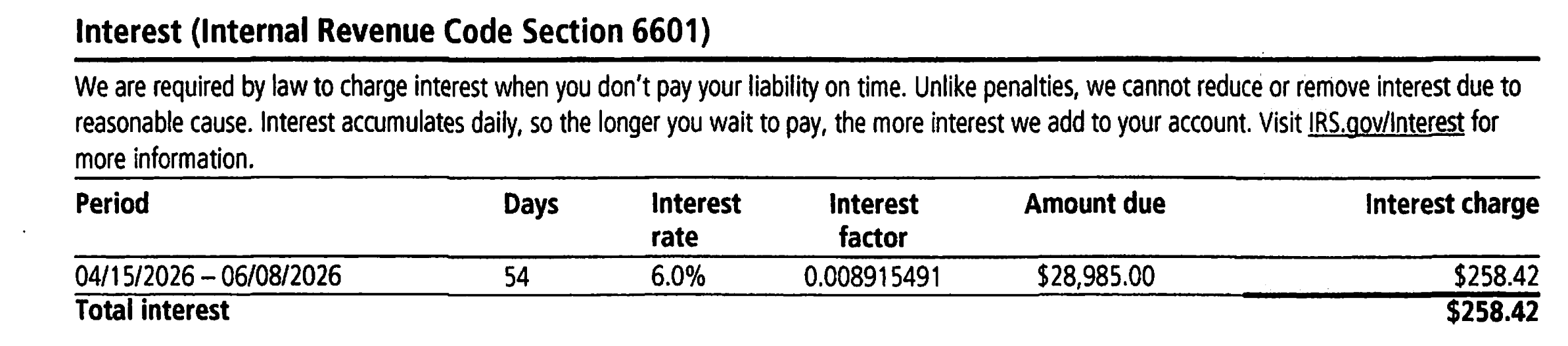
The IRS is required by law to charge interest under Internal Revenue Code § 6601 on any tax not paid by its due date.
Unlike penalties, interest generally cannot be waived for reasonable cause, and it compounds daily — so the longer a balance goes unpaid, the more it grows.
Part 8: IRS Help
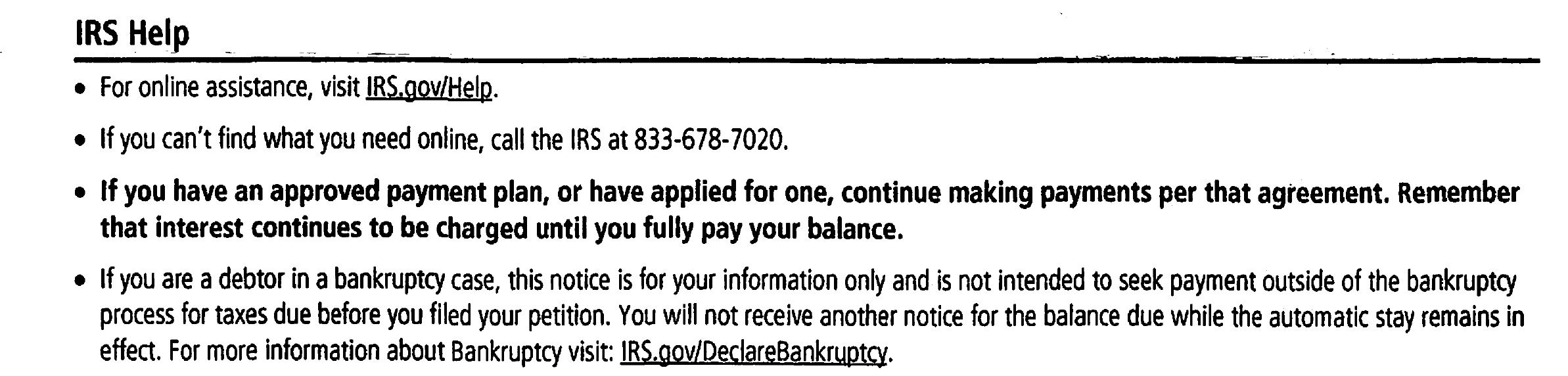
This section gives you the phone number to call if you have questions, along with a reminder that if you already have an approved payment plan, you should keep making your scheduled payments, and a note for taxpayers currently in bankruptcy.
Part 9: Payment Coupon
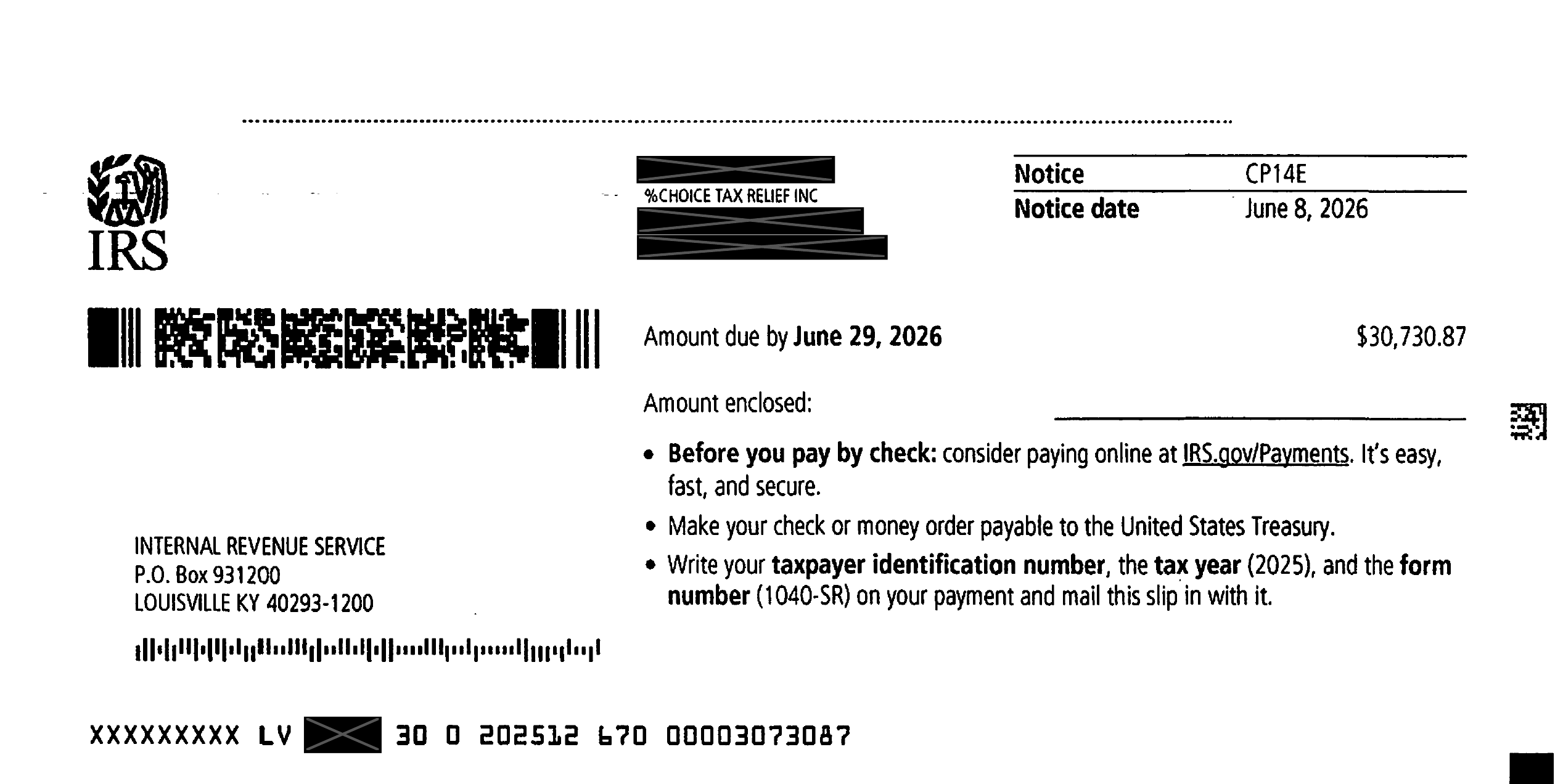
At the bottom of the last page is a detachable payment coupon.
If you’re paying by check or money order, detach this stub, make your payment out to the “United States Treasury,” write your taxpayer identification number, the tax year, and the form number on the payment, and mail it in along with the coupon to the address listed.
When the IRS Sends Notice CP14E
Here is the most common situation in which the IRS sends Notice CP14E:
- You filed a tax return for the year in question (often a Form 1040-SR).
- You did not pay, in full, the amount due indicated on the tax return, including penalties and interest.
However, as with the standard CP14, there are other situations in which you might receive this notice.
For example, if you filed your return after the due date and paid the tax indicated on the return at the time you filed, you might assume you don’t owe the IRS anything further.
But because you filed and paid late, the IRS will likely have assessed a failure-to-file penalty, a failure-to-pay penalty, and interest — creating a balance due even though you thought you’d paid in full.
In that case, the IRS will send you a CP14E (or CP14) notice for the difference.
Finally, the IRS may have sent you this notice in error — for instance, if you paid your balance on time but the IRS didn’t properly credit the payment to your account.
Owe the IRS? Talk to a tax expert — free.
What You Should Do If You Receive a CP14E Notice
Below is how you should respond to a CP14E Notice, step by step.
For more information about each of these steps, check out our article How to Fight the IRS and Win.
Step 1: Check the CP14E Notice for accuracy.
The IRS can make mistakes, so review the calculations on your CP14E Notice carefully and make sure the numbers match your own records.
Step 2: Correct any errors with the IRS.
If you find something you disagree with, take it up with the IRS.
The notice itself provides the phone number to call if you disagree with something in it.
Getting through to the IRS can be difficult, so feel free to reach out to us at 866-8000-TAX if you’d like us to contact the IRS on your behalf — our staff is on the phone with the IRS all day.
Step 3: Seek penalty abatement.
Once you’ve confirmed the notice is accurate (or corrected any errors), it’s worth exploring penalty abatement to see if any of the assessed penalties can be reduced or removed.
Step 4: Pay the balance due or seek tax relief.
At this point, you and the IRS should be in agreement as to how much you owe (assuming any balance remains after Steps 1 through 3).
First, find out if you qualify for an offer in compromise, which allows you to settle your tax debt for less than you owe.
If you don’t qualify for an offer in compromise, you have other options:
- Obtain a temporary pause on collection based on hardship, known as currently not collectible status.
- Set up an installment agreement with the IRS.
- Pay off your balance in full to stop any further accrual of penalties and interest.
For an overview of how tax relief works, read our article What Is Tax Relief and How Does It Work?
How to Pay Your CP14E Online
If you agree that you owe the amount due on your CP14E Notice and want to pay it in full now, you can send in a check with the payment coupon at the bottom of the last page of the notice.
If you’d rather pay online, go to irs.gov/payments and select the payment method that works best for you.
Is the CP14E only sent to Form 1040-SR filers?
This client’s notice we reviewed in preparing this article was tied to a Form 1040-SR balance due.
The IRS’s own description of the CP14E states simply that it’s sent when a taxpayer “filed with a balance due and didn’t pay by the return due date” — the same underlying reason a taxpayer would receive a standard CP14.
We haven’t seen official IRS guidance limiting the CP14E strictly to 1040-SR filers, so if you received one tied to a different form, don’t assume anything is unusual about your notice — treat it like any other balance-due notice and follow the steps above.

“I did a lot of research and spoke to multiple companies that help with tax resolution. I’m glad I chose Choice Tax Relief. They are very knowledgeable and professional.”
Get Help Now
Got a CP14E notice? Don’t wait for the IRS’s next move.
Talk to a tax expert — free, no obligation. We’ve resolved over $20 million in IRS debt for our clients.


Author:

Logan Allec, CPA, Founder and Owner
Logan Allec has been serving taxpayers as a CPA for over 14 years. After leaving his role at a "Big 4" firm, he started Choice Tax Relief to help everyday Americans who have found themselves behind on their taxes. He also educates thousands of people daily about tax relief on his YouTube channel. In addition to his CPA license, Logan also has a Master's Degree in Taxation from the University of Southern California (USC). He lives with his wife and children in the Los Angeles area. Learn more about Logan here.